auto: looks cute, sounds mid
♪(/_ _ )/♪
This is not an interesting story, it’s rather a story of how over-complicating things and find solution to non-problems sometimes is also rewarding.
I recently bought a stereo from a flea market nearby. It was incredibly cheap and I bought it mostly for its aesthetic. It’s an old Sony FH-414 (<- link to a reddit post saying that is actually not that good),
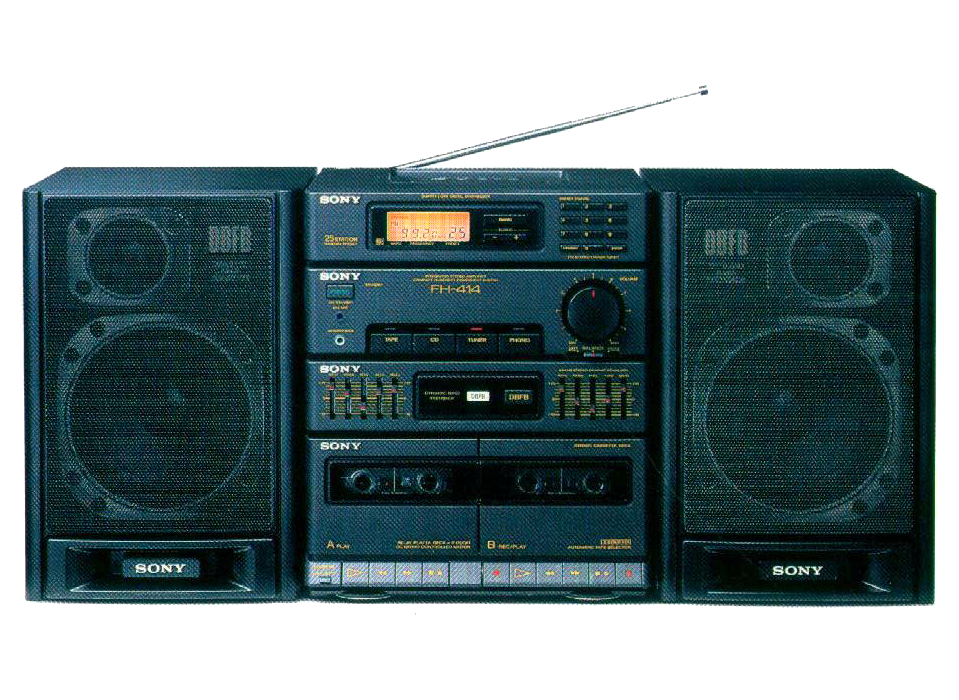
which serves its purpose: look vintage. The sound is not that great and the tape player/recorder break (which seems to be a common problem of this model).
I also happen to have a spare Raspberry Pi 3b. I used to leave it on to stream legitimately downloaded content in my LAN trough dlna (all hail our lord and savior (formerly) minidlna) but nowadays it’s just an overpriced paperweight.
You can see how by easily combining these two information I came up with a very original idea: making the RPi a music streamer with the stereo.
~(>_<~) the problem
Imagine: it’s Sunday, 1 PM, you invited some friends over to have lunch together. Of course you want to put some music on to facilitate the conversation, not too loud, just enough to be an enjoyable background.
an easy solution
a Bluetooth speaker. They’re cheap (most of them) and the problem is basically solved.
a related non-problem
your whole phone audio is now everyone real estate. That embarrassing audio form your imaginary girlfriend? you cannot hear it (even though it’s just in your head). The story with a 2005 song at full volume? forget that. Your phone is not yours anymore.
__φ(..) an over-engineered solution
You see where this is going. The RPi can become a streamer, just plug its aux output into the stereo. You then just need two tools to make everything work
spotifyd:: a spotify daemon. It sits in background and is available from your spotify as a separate devicesystemd:: the goat. the service manager of your favorite distro. If you know it you love it, if you don’t love it you’re too expert for this story what are you doing here? Also, can you get in touch? I have some recurring problems runninghurdthank you.
First, let there be light
I installed Raspberry Pi OS, which is basically debian with batteries included, adding some functionalities to easily setup the raspberry bells and whistles.
Second: let there be.. infrastructure(?)
I needed spotifyd, but I wanted all the features! I did not actually need most of them, but maybe in the future I would like to add some controllers? something to start/stop the music from an external device dialoguing with the daemon with MPRIS? I knew nothing. I choose to go with the full version, but compiling it was too much for my poor RPi
cargo install spotifyd --locked --all-features
took too long, after one day of compilation stuck I actually spent 5 minutes reading the documentation: they had precompiled binaries in their releases page on github (link!)
Third: let there be Poettering
Firing up everyone’s favorite lisp interpreter and adding a the spotify daemon was very straight forward
# $XDG_CONFIG/systemd/user/spotifyd.service

[Unit]
Description=A spotify daemon
Documentation=https://github.com/Spotifyd/spotifyd
Wants=sound.target
After=sound.target
Wants=network-online.target
After=network-online.target

[Service]
ExecStart=/home/luser/.cargo/bin/spotifyd --no-daemon
Restart=always
RestartSec=12

[Install]
WantedBy=default.target
The unit wants sound and network-online targets, with them up it can be fired, running spotifyd as a daemon, separating it from your precious (yet profane) phone audio, is just a matter of
systemctl --user daemon-reload
systemctl --user enable spotifyd.daemon
Fourth: let there be problems
spotifyd uses a zeroconf approach on authentication, requiring a UI to open a browser and logging into your spotify premium account. However I did all of this tough ssh, so ???? what I needed was zeroconf condfiguration, this was a matter of running spotifyd auth, from an active spotify client select the raspberry pi in the devices section and finally profit.
Fifth: let there be rock
The daemon is ready, the account is logged in, everything works, the stereo plays (the cassette was not working, this seemed appropriate)